
Diese Anweisungen variieren zwischen den Modellen. Ihr Produkt erkennen
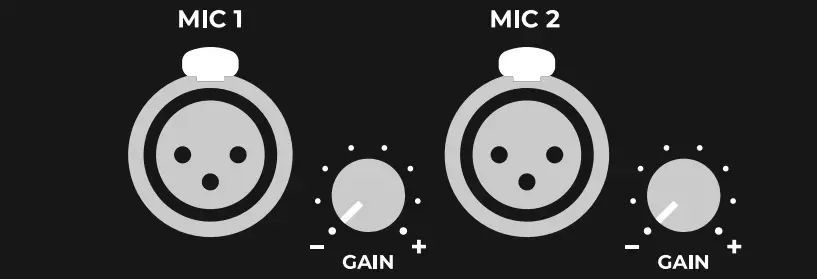
Artome devices are equipped with two XLR microphone ports. These ports are designed to work plug-and-play with dynamic microphones.
Microphone dynamics
By default the XLR inputs are set to mic level. The input signal goes through microphone dynamics like high-pass filter, compressor and equalizer.
Input controls
There are additional controls for the microphone inputs depending on the version of your Artome device.
HW232 devices
Microphone input sensitivity can be switched between line and mic mode from Artome Connect app. There’s an additional volume control in the app. Line mode also disables the microphone dynamics. Artome Connect Audio Settings
HW231 devices
Line mode disables the microphone dynamics but the input sensitivity is mic level. There’s also an additional volume control in The Artome Connect app. Artome Connect Audio Settings
HW20 devices
Microphone gain control knobs were added in 01/2024.
Zusätzliche Informationen
Phantom power
Artome microphone inputs don’t include phantom power.
Wireless microphones
Artome devices are designed to work with wireless microphones. Artome rack space enables easy installation of wireless receivers and the XLR connector support up to two plug-and-play microphones.
For optimal performance, make sure to check the microphone and receiver settings depending on the microphone system in use.
- Select the mic level output of the wireless receiver. Mic level is also the default level of Artome XLR inputs.
- You can connect line level outputs but make sure to match the Artome XLR inputs by changing the input sensitivity to line level.
- Set the squelch setting to medium or more so the receiver doesn’t pick up any radio disturbance.
- Adjust the input sensitivity directly from the microphone to an adequate level.
- Adjust the receiver output volume to an adequate level.
Multiple microphones
Its possible to connect more than to microphones. In case you need to connect multiple microphones, first consider the following:
- You need to set the Artome XLR input sensivity to line level. This disables Artome’s microphone dynamics and the XLR inputs function as balanced line inputs.
- When line mode is selected, Artome DSP’s built in microphone dynamics are disabled. This might affect the user experience.
- Use a mixer or similar for signal distribution to connect multiple microphones to Artome XLR inputs.