Diese Funktion wird von HW23x-Geräten unterstützt. Ihr Produkt erkennen
Diese Funktion wurde in einem Firmware-Update eingeführt. Aktualisieren der Geräte-Firmware
Standardmäßig befinden sich die Artome-Mikrofonanschlüsse zur einfachen Mikrofonnutzung im Mikrofonpegel-Modus. Der Eingangsmodus kann geändert werden, falls ein Mikrofonsystem, ein Mischpult oder eine andere Line-Pegel-Quelle angeschlossen wird.
HINWEIS: Bei HW231-Geräten ändert sich die Eingangsempfindlichkeit nicht, aber die Mikrofondynamik (Gate, Kompressor, HPF) ist deaktiviert. Verwenden Sie den zusätzlichen Regler für den symmetrischen Eingang in der Connect-App, um die Eingangsempfindlichkeit oder die Lautstärkeregler des angeschlossenen Audiogeräts anzupassen.
Anweisungen
Artome Connect
- Öffnen Sie die App auf Ihrem Mobilgerät. HINWEIS: Sie müssen mit Ihrem Artome-Gerät verbunden sein.
- Gehe zu Einstellungen > Audio
- Stellen Sie den Modus für den symmetrischen Line-Eingang auf Line-Eingang ein.
Fernbedienung
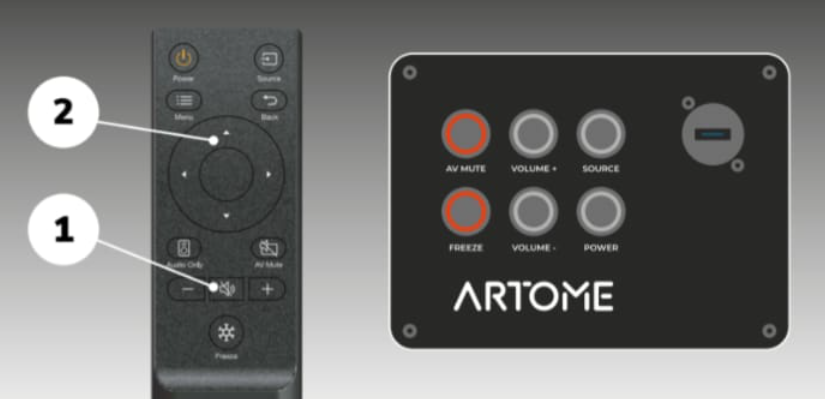
- Halten Sie die MUTE-Taste der Fernbedienung 10 Sekunden lang gedrückt, bis die LEDs für AV MUTE/PAUSE und FREEZE aufleuchten.
- Blinken: Line-In-Modus ist aktiv
- NETZSCHALTER blinkt: Mikrophonmodus ist aktiv
- Benutzen Sie die Tasten UP und DOWN, um den gewünschten Modus auszuwählen. Bestätigen Sie durch Drücken der MUTE-Taste.