
Hallitse kokemusta
Hienosäädä Artome
Yksi sovellus
Täysi hallinta
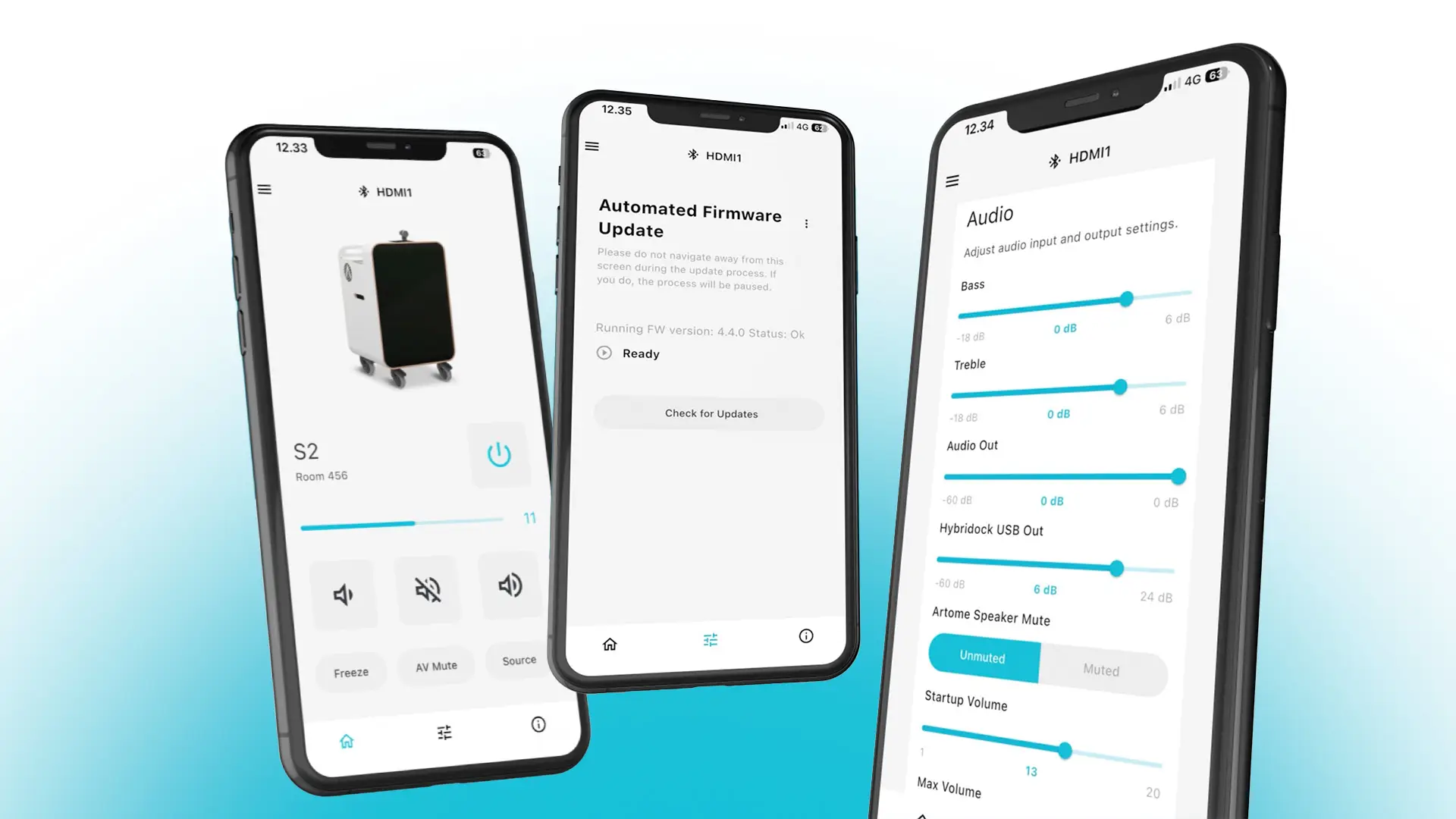
Mene perussäätöjä pidemmälle ja mukauta Artome-laitteesi tilaan ja käyttötapoihisi sopivaksi. Artome Connect tarjoaa pääsyn laitteen, äänen, verkon ja turvallisuuden asetuksiin. Määritä äänitulot ja -lähdöt, säädä äänitasoja ja hallitse laitekohtaisia asetuksia yhdestä paikasta.
Päivitykset tehtiin yksinkertaistettuna.
Pidä laitteesi
päivitetty
Varmista asennetun laiteohjelmiston versio, katso, milloin uusi versio on saatavilla, ja päivitä Artome suoraan sovelluksen kautta. Artome Connect auttaa pitämään laitteen ohjelmiston ajan tasalla ilman monimutkaisia päivitysprosesseja.
Tuki- ja neuvontatietoja
Laitteen tiedot
kun sitä tarvitaan
Pääset käsiksi tärkeisiin tietoihin Artome-laitteestasi, mukaan lukien sen malliin, sarjanumeroon, laiteohjelmistoon ja laitteistovaiheisiin.
Tuki- ja neuvontatietoa voi myös saada suoraan sovelluksesta, mikä helpottaa oikean tiedon löytämistä, jos apua tarvitaan.
DSP-asetukset Artome Connect -sovelluksen kautta
Bassot ja korkeat taajuudet
Säädä basson ja diskanttitoiston tasoja hienosäätämään ääntä mieltymystenne mukaan.
Max Volume
Säädä Artome-laitteen enimmäismääräinen kaiutinosoitinvoimakkuus.
Lähtöteho
Säädä XLR-tulojen herkkyyttä, kun Line-tila on valittuna.
Mikrofonin/linjan valitsin
Valitse mikrofoni- tai linjatasot mikrofoniliitännöille.
Hybridock USB Out
Säädä Hybridockin USB-lähtöteho videoneuvotteluihin.
Ääni poistettu
Poista sisäiset Artome-kaiuttimet käytöstä, kun käytetään ulkoista äänentoistojärjestelmää.
Aux In Volume -tila
Säädä epätasapainotetun AUX-tulon äänenvoimakkuutta.
Ääniliitännän äänenvoimakkuus
Säädä Audio Out -liitännän lähtötasoa.
Lataa
Lataa Artome Connect
Lataa Artome Connect sovellus täältä App Store tai Google Play ja hallitse Artomeasi puhelimestasi.