
L'application Artome Connect dispose de paramètres audio supplémentaires pour personnaliser davantage votre appareil en fonction de votre cas d'utilisation spécifique. Les paramètres audio varient selon les versions matérielles, les modèles d'appareils et le micrologiciel installé.
Tous ces paramètres sont permanents et ne peuvent être ajustés qu'à partir de l'application. Les paramètres audio se trouvent dans l'onglet des paramètres.
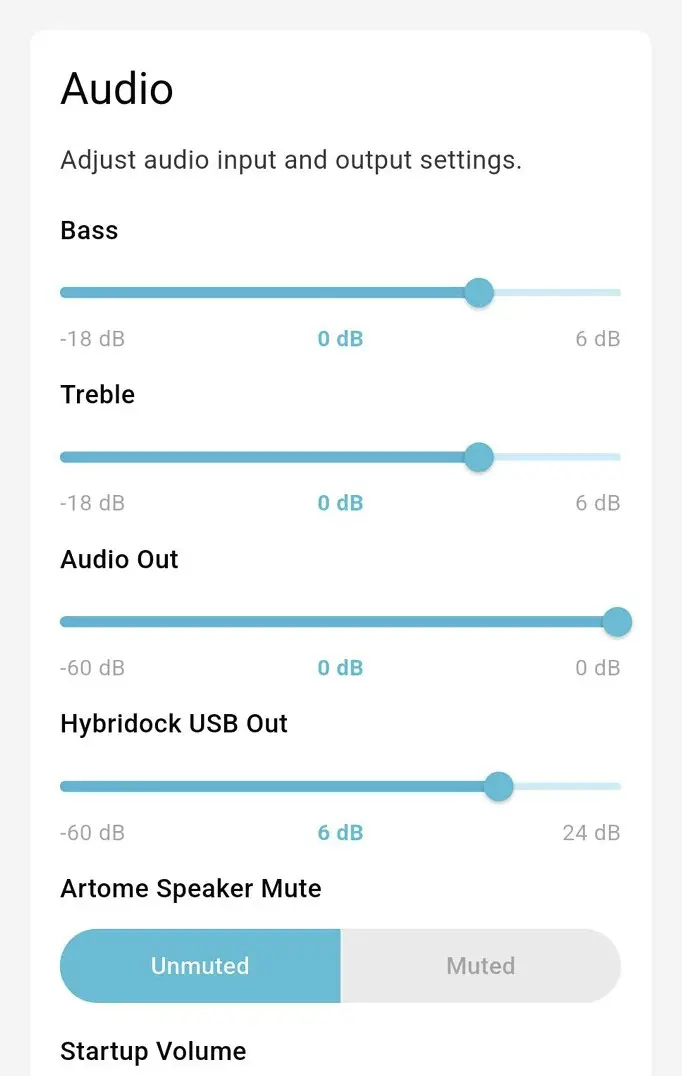
Graves et aigus
Le niveau des basses contrôle les basses fréquences jouées par le haut-parleur de graves. Le niveau des aigus contrôle les fréquences plus élevées. Utilisez les curseurs pour régler l'audio au niveau souhaité.
Volume de la sortie audio
Le niveau de sortie audio contrôle le volume de sortie des connecteurs de sortie audio. Ce paramètre est disponible pour les appareils dotés de connecteurs de sortie audio.
Mode de sortie audio
La sortie audio peut être commutée entre le mode mono et stéréo. Ce paramètre est disponible pour les appareils dotés de connecteurs de sortie audio.
Sortie USB Hybridock
Contrôle le niveau auquel les entrées microphone Artome sont envoyées à l'interface audio USB (par exemple, le niveau du microphone Hybridock dans Teams, Zoom ou Meet).
Désactivation du haut-parleur Artome
Ce paramètre permet de désactiver les haut-parleurs internes d'Artome lorsqu'un système de sonorisation externe est utilisé.
Volume de démarrage
Ajustez le volume de démarrage de l'appareil.
Volume Maximum
Ajuster le volume maximal de l'appareil.
Volume auxiliaire
Le niveau de l'entrée auxiliaire (Aux in) contrôle le volume de l'entrée audio non symétrique située à l'arrière de l'appareil. Ce paramètre est disponible pour les appareils équipés d'un connecteur d'entrée auxiliaire.
Mode d'entrée symétrique
Ce paramètre permet de sélectionner si les entrées XLR fonctionnent au niveau micro ou au niveau ligne. Le paramètre par défaut est le niveau micro.
Pour les appareils HW232, la sensibilité d'entrée est modifiée. Pour les appareils HW231, seules les dynamiques du microphone sont désactivées mais la sensibilité reste élevée. Reconnaissance de votre produit
Niveau d'entrée ligne symétrique
Utilisez le curseur pour ajuster le niveau d'entrée des entrées XLR symétriques.
Carillons de réglage du volume
Activer ou désactiver les sonneries de réglage du volume.
Réinitialiser les paramètres audio
Le bouton de réinitialisation ramène les paramètres audio ci-dessus à leurs valeurs par défaut.