
Il existe plusieurs produits Artome ainsi que des versions matérielles de ces produits. Cet article vous aide à identifier votre produit et votre version matérielle.
Trouvez l'étiquette du produit
- Ouvrez la porte d'entrée de votre appareil Artome.
- L'étiquette est située sur la paroi interne de l'appareil.
Comprendre le format série
Le numéro de série sur l'étiquette indique le modèle de l'appareil, suivi de la version du matériel.
Produits HW23
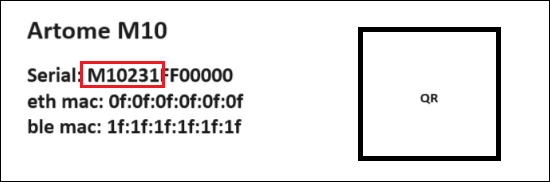
La partie ‘ M10231 ’ du numéro de série indique que l'appareil est un modèle Artome M10 avec la version de matériel HW231.
Variantes disponibles
HW231, HW232
Produits HW20
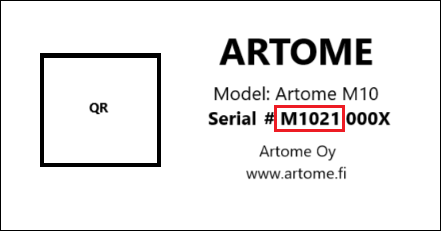
La partie ‘ M1021 ’ du numéro de série indique que l'appareil est un modèle Artome M10 doté de la version matérielle HW21.
Variantes disponibles
HW21, HW22