
Ces instructions varient selon les modèles. Reconnaître votre produit
La mise au point de l'image devra peut-être être ajustée lorsque l'appareil Artome est déplacé et que la distance de projection change.
Série S d'Artome
Modèles sans loquet latéral
- Ouvrez la porte d'entrée et localisez l'évent de refroidissement du projecteur. .
- Poussez le levier sur le dessus pour ouvrir l'évent.
- Ajustez jusqu'à ce que l'image soit nette.
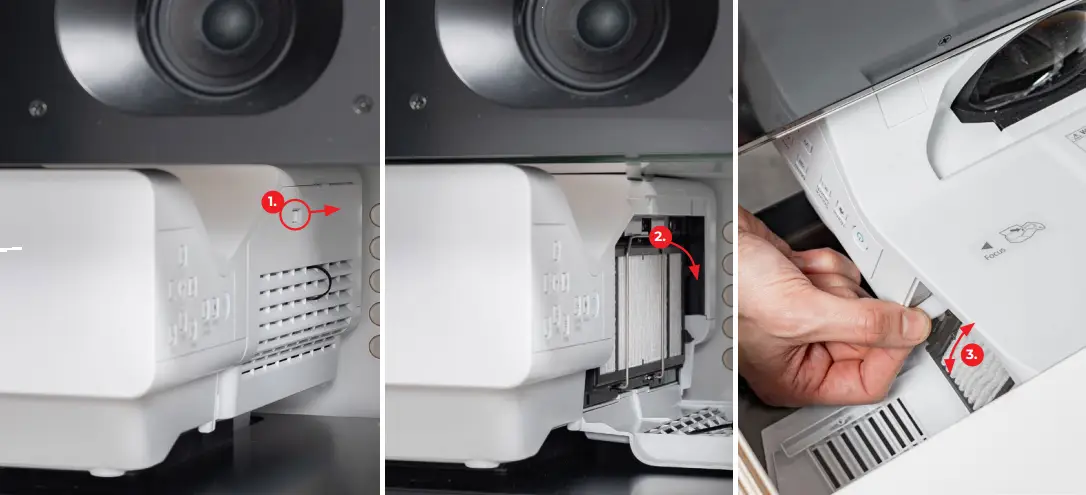
Modèles avec loquet latéral
- Ouvrez le loquet latéral.
- Poussez le levier sur le dessus pour ouvrir l'évent de refroidissement du projecteur.
- Ajustez jusqu'à ce que l'image soit nette.
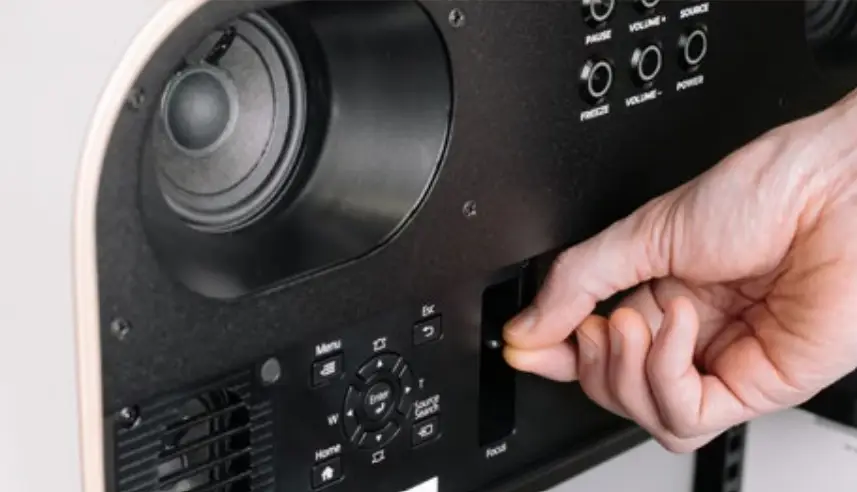
Artome M10
- Ouvrez la porte avant de l'appareil.
- Le levier de mise au point est positionné à côté des boutons physiques du projecteur.
- Ajustez jusqu'à ce que l'image soit nette.
Artome X10
- Ouvrez le loquet de l'objectif.
- Le levier de mise au point est situé autour de l'objectif du projecteur.
- Les projecteurs du modèle PT-VMZ-ST sont dotés d'une mise au point motorisée.
- Utilisez les boutons du projecteur pour régler la mise au point.
- De plus, maintenez enfoncé le bouton FREEZE d'Artome pour activer le réglage de la mise au point. Utilisez les boutons VOL pour l'ajuster.
- Ajustez jusqu'à ce que l'image soit nette.
Artome X20
- Appuyez longuement sur FREEZE sur le panneau de boutons Artome ou sur la télécommande Artome pour ouvrir le menu de réglage de l'image.
- Appuyez sur le bouton FREEZE pour faire défiler les différentes fonctions : mise au point, zoom, déplacement de l'objectif.
- Utilisez la croix directionnelle de la télécommande pour régler les valeurs. Vous pouvez également utiliser les boutons VOL du panneau de commande Artome.
- Ajustez jusqu'à ce que l'image soit nette.
- Quittez le menu en faisant défiler les fonctionnalités avec le bouton FREEZE.