
These instructions vary between models. Recognizing Your Product
Image focus might need adjusting when Artome device is moved and the projection distance changes.
Artome S-series
Models without side latch
- Open the front door and locate the projector cooling vent. .
- Push the lever on top to open the vent.
- Adjust until the image is clear.
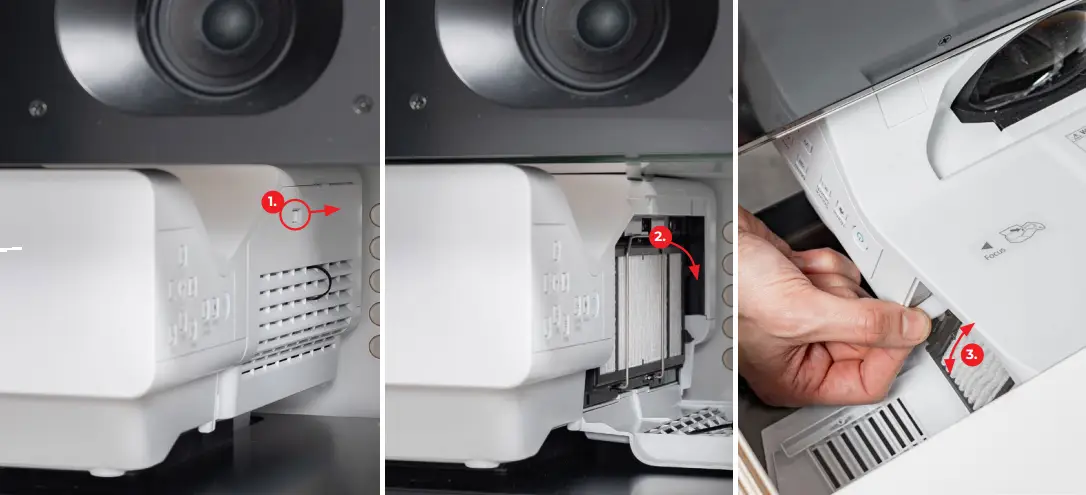
Models with side latch
- Open the side latch.
- Push the lever on top to open the projector cooling vent.
- Adjust until the image is clear.
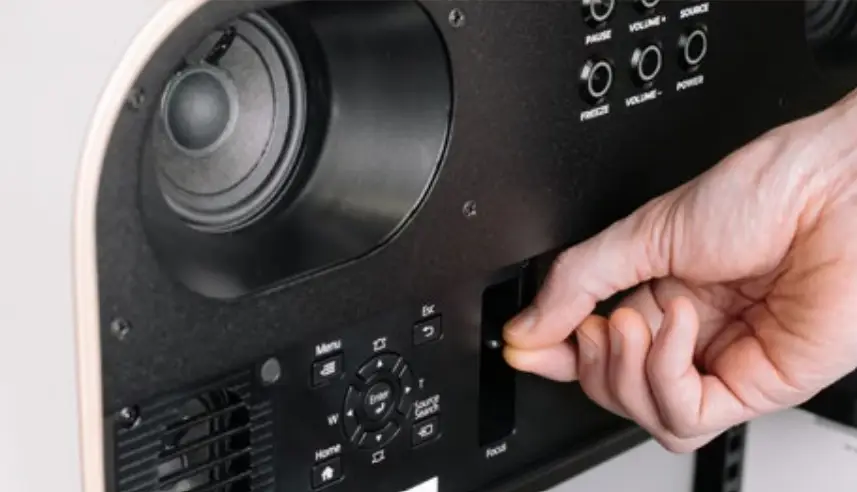
Artome M10
- Open the front door of the device.
- The focus lever is positioned next to the projector’s physical buttons.
- Adjust until the image is clear.
Artome X10
- Open the lens hatch.
- The focus lever is located around the projector lens.
- PT-VMZ-ST model projectors have motorized focus.
- Use projector buttons to adjust focus.
- Additionally long-press Artome FREEZE button to activate focus adjustment. Use VOL buttons to adjust.
- Adjust until the image is clear.
Artome X12
- Open the lens hatch.
- The two focus levers are located around the projector lens. Adjust both to get a sharp image.
- Adjust until the image is clear.
Artome X20
- Long-press FREEZE on Artome button panel or Artome remote to open image adjustment menu.
- Press FREEZE button to cycle between different features: focus, zoom, lens shift.
- Use the D-pad on the remote to adjust the values. Alternatively use the VOL buttons on Artome button panel.
- Adjust until the image is clear.
- Exit the menu by cycling through the features with the FREEZE button.