
Associez votre appareil Artome à l'Artome Connect pour le contrôle à distance, les mises à jour du micrologiciel et les paramètres avancés.
Artome Connect est compatible avec les appareils Artome dotés du matériel HW231 et versions ultérieures. Reconnaître votre produit
Instructions
- Assurez-vous que votre appareil Artome est en veille ou allumé.
- Ouvrez l'application Artome Connect.
- Appuyez sur Ajouter un appareil ou le coin supérieur gauche Menu pour ouvrir la vue des appareils. L'application commence à rechercher les appareils à proximité automatiquement.
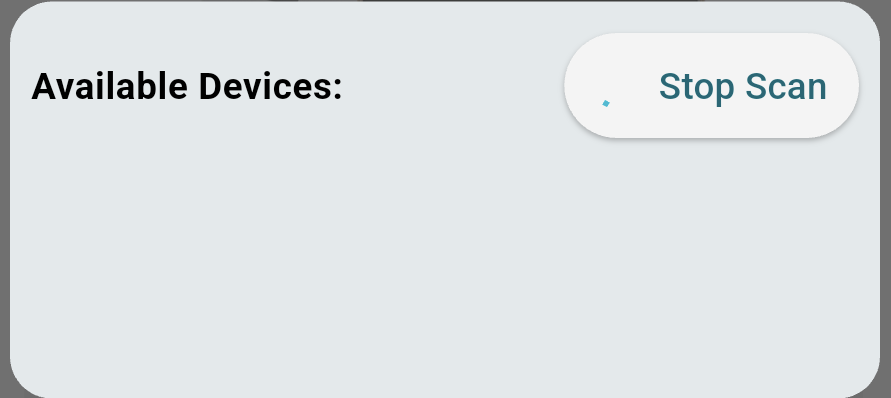
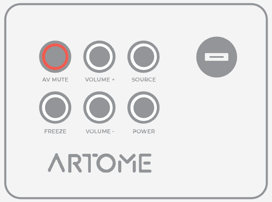
- Activez le mode appairage en maintennant enfoncé PAUSE / SOURDINE AV sur le panneau de boutons jusqu'à ce qu'il clignote.
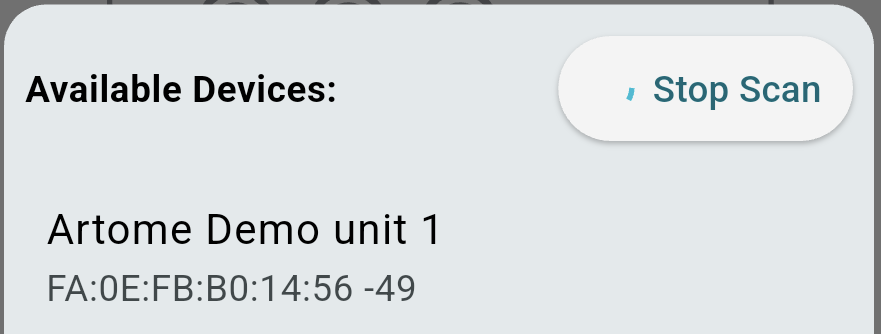
- L'appareil apparaît maintenant dans la liste des appareils. Sélectionnez l'appareil trouvé.
- Acceptez les demandes de jumelage Bluetooth.
- iOS : une demande de notification pop-up apparaît.
- Android : une fenêtre contextuelle ou une demande de notification apparaît. La demande doit être acceptée deux fois.
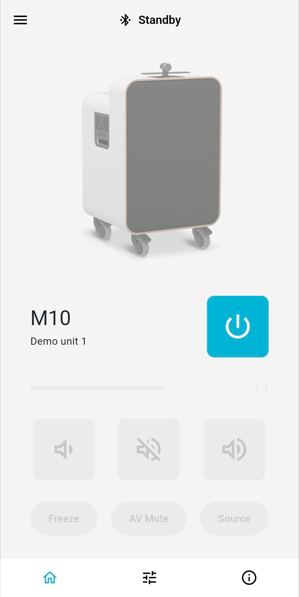
- L'appareil est maintenant couplé et prêt à l'emploi.
Problèmes de jumelage ?
- Vérifiez qu'aucun autre appareil mobile n'a de connexion active avec votre unité Artome. Cela interrompt le processus d'appairage.
- Dans les paramètres Bluetooth de votre appareil mobile, supprimez tout appareil nommé Artome.
- Android : Paramètres > Bluetooth > Sélectionner un appareil nommé Artome > Dissocier
- iOS : Réglages > Bluetooth > Appareil nommé Artome > Bouton d'information > Oublier cet appareil
- Rouvrez l'application et recommencez le processus de jumelage.
- Si les étapes ci-dessus ne vous aident pas, éteignez et rallumez votre appareil Artome, puis recommencez le processus de jumelage.