
Change your device related settings with the Artome Connect app. These settings are located on the settings tab, under the Device menu.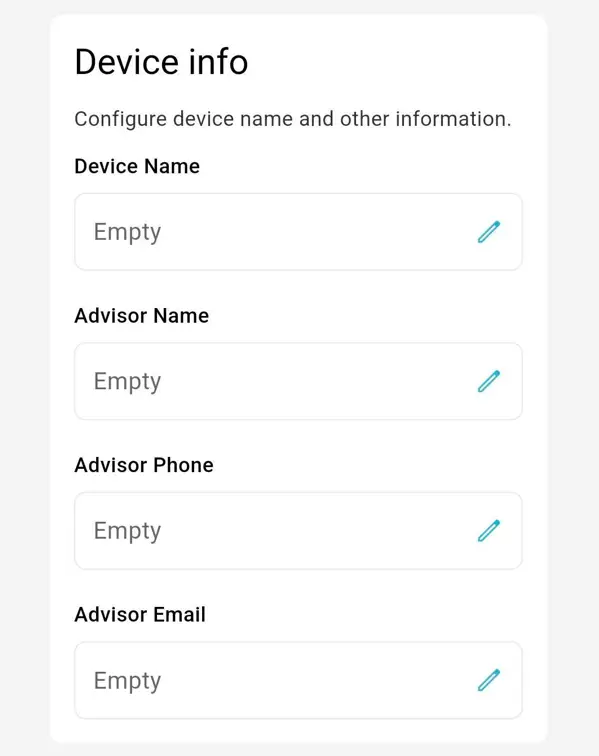
Auto Keystone
Toggle the automatic keystone adjustment on or off depending on your preference. This settings is available for models equipped with automatic angle adjustment.
USB Hub
Turn the USB hub on or off. When the hub is off, connected USB devices don’t show up on the computer and don’t get power.
USB Power Output
Choose when the USB device ports supply power By default, the device ports supply power only when a host computer is connected to the Artome+ USB-B port. Set the power mode to Always on to keep the ports powered even when no computer is connected.
Nombre del dispositivo
Dale a tu dispositivo un nombre amigable para reconocerlo más fácilmente. Este nombre se muestra en la aplicación Artome Connect y como el nombre Bluetooth del dispositivo.
Nombre del Asesor
Ayude a los clientes finales a ponerse en contacto con su equipo audiovisual añadiendo el nombre del asesor.
Teléfono del Asesor
Ayude a los clientes finales a ponerse en contacto con su equipo audiovisual añadiendo el número de teléfono del asesor.
Correo del asesor
Ayude a los clientes finales a ponerse en contacto con su equipo audiovisual añadiendo el correo electrónico del asesor.